
It doesnt work, he logs in wirh my credentials in his iphone 11 (with the updated app, installed and unistalled etc) and the cameras wont show up. Why???
Did you deject the correct log in region?
1 Like
Hello!
First of all, how is this still a problem after so much time? Do engineers even know about it?
I’ve been trying to share camera access with my wife and I see the same problem: Invalid QR code or user not found.
I need to finish setting it up by Wednesday evening. What is the best way to resolve it?
1 Like
Thanks for coming to the forum for more information @arp I am sorry to hear you’re having troubles.
- You can share your login credentials with your wifi so she can have full access to the account.
- Go to Account menu. Select Sharing. Tap on the camera you want to share with your wife. Tap the big green (+) sign button next to “Share cameras with your family”. Instead of using a QR code, select “Share with Yi Account”. Either, have her scan your QR code or you scan hers. You can do either. If the code is invalid, there is an option to refresh at the bottom of the QR code screen.
Keep us posted on your progress.
having the same problem
I see many replies to check about the region, but how do I do that?
Great question @glebvk !
Log out of your account on the app.
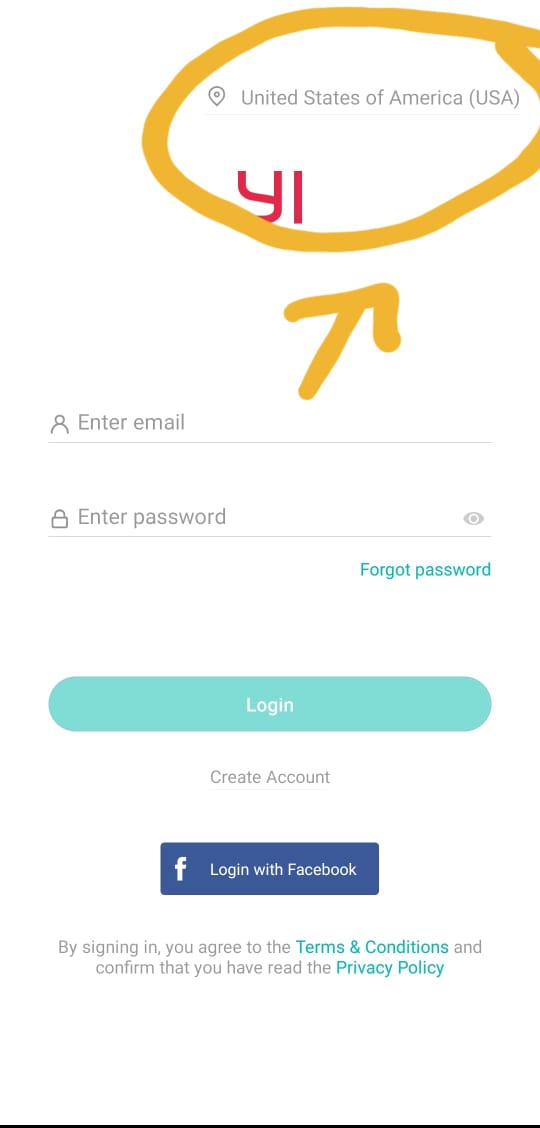
On the app login screen, in the upper right corner is your region selector.
Check your region.
If comfortable, you can share your login credentials so they have access to the app this way. It is up to you whether you would like to do this option.
hi Kami,
I live in the UAE and I have given this camera to my family who is in India, can i still have sharing access ?
Dear [Steven]
I got the same problem
1 Like
Hey @Yazdian Are you comfortable sharing your login info? That might be the easiest and quickest way to get this resolved. its not a widespread issue a large number of people are experiencing. A number people just share their login info and all is well 
what if I am not comfortable sharing my login and other solution did not work?
Don’t you have a solution to share by email? why do I get User not found
?
Hey @gilad Welcome to the community. I am sorry to hear you’re having trouble sharing your account. Can you send me a screenshot of the message you receive when you try to add someone to sharing?
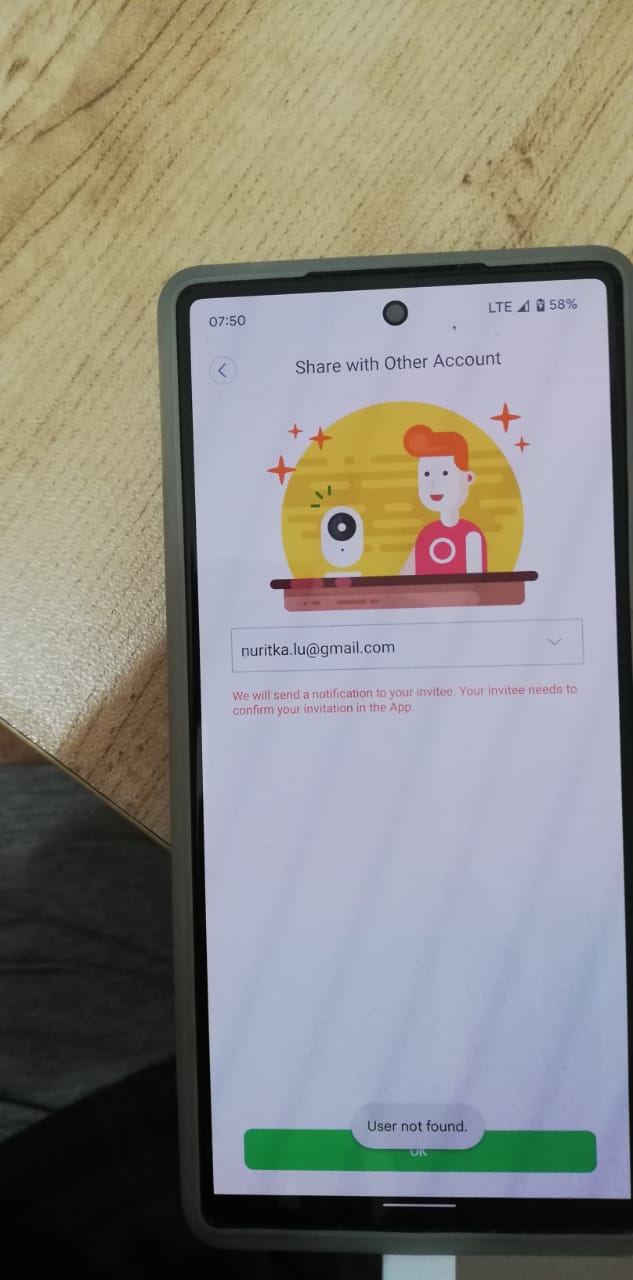
Can you remove them completely and try again? Double check the email address. Can you try sharing the account with another one of your email addresses to test to see if you receive the same message?
Hello i am having the same issue from Saudi Arabia
Tried all mentioned solutions
Wive’s account still “user not found”
QR code same error as everyone else
Any solution??
Thanks
Hey @Omarmb Are you comfortable sharing your login credentials with your wife? That would be the quickest resolution. She can then have full access to the account.
HI i’ve just encounter the same problem.
here is my fix:
- recheck location when u login (USA is the default on my phone)
- make sure you verified the account
1 Like
Hi
Iam having the same problem
I try all what ever mentioned in above but still facing the same problem.
Me and my wife have Huawei mobiles and living in same house in KSA and I double checked that we both have same country one we created our accounts
I’m really disappointed